-->

Bringing the Universe to Classrooms
and Homes Around the World!

Showing posts with label iPad. Show all posts

Saturday, September 13, 2014

5 Great Astronomy Apps for the iPad

One of the benefits of working in the field of astronomy education is the opportunity to try out all of the different astronomy apps designed for iPads and iPhones. iPhones have been very popular in the past couple of years. Exploring the objects in the night sky is fun on an iPhone, however, even better on an iPad. There is simply no comparison between the experience that you get from an iPad astronomy app and its counterpart for the iPhone. The larger screen, especially the iPad 3′s retina model, makes a whole lot of difference.

In the event that you are into stargazing and need to utilize your iPad to investigate the objects in the night sky more than ever, these 5 astronomy applications for the iPad will have you prepared:

Star Walk App Screen Capture

Star Walk: provides you with a breathtaking experience with the stars right on your iPad. Can identify the stars as you explore them on your device too.

Red Shift App Screen Capture

Red Shift: This is another wonderful astronomy app for the iPad. It covers around 100,000 stars and 500 plus Deep-Sky objects. This app provides support for iPad 3′s retina display. The 3D flights to the moon and planets are breathtaking.
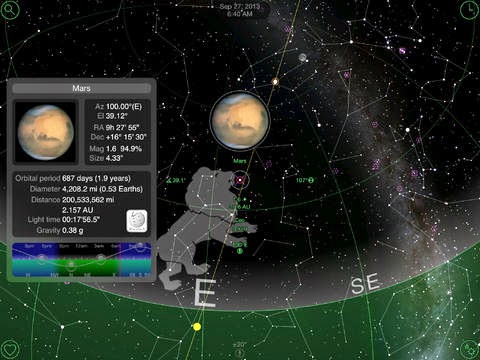
GoSkyWatch Planetarium App Screen Capture

GoSkyWatch Planetarium: This astronomy app contains all the stars visible to the naked eye. This is not only a great learning tool for amateur astronomers, but it can also serve as a handy object identification tool. It also offers information on moon phases and sunrise and sunset times for all locations.

Solar Walk Planetarium App Screen Capture

Solar Walk: Assists you with investigating the Earth's planetary group to the fullest extreme. This app covers all of the planets and their satellites in our solar system.

SkySafari 3 App Screen Capture

SkySafari 3: This is an astronomy app that has everything you need to explore the stars and other objects. You can use this to identify the stars. The night mode allows an observer to preserve their night vision. The Pro version offers many more features.
Read More

Saturday, July 13, 2013

Blake Planetarium Receives Grant from itelescope.net

With a generous research grant awarded from iTelescope.net, a research project utilizing remote robotic telescopes for astronomy education called "Discovering our Milky Way Galaxy" will be a collaboration between the W. Russell Blake Planetarium, Insight Observatory, iTelescope.net and a group of students in grades 6-8. The planetarium will place a large printout of the Milky Way Galaxy, the way we see it from Earth, on the outside wall of the planetarium. The printout of the Milky Way will cover the view from both hemispheres. The students will be paired in groups of two and each group will be assigned a deep-sky object in or near the visible arm of the visible Milky Way. 

Northern Arm of Milky Way Galaxy imaged from iTelescope.net's New Mexico Skies location
Northern Arm of Milky Way Galaxy imaged from iTelescope.net's New Mexico Skies location

They will be in charge of imaging this object and writing a paragraph about it. When the images are returned, Michael Petrasko and Muir Evenden, Co-Project Directors from Insight Observatory will assist them with processing the images. The final pictures of the students' deep-sky objects will be placed along with the image of the Milky Way on the outside of the planetarium for all of the school and visitors to see and learn from.

The research project is slated to take place in October 2013. Planetarium Instructor, Monica Ares, will have the students come to the planetarium for an overview of the project and to look at the Milky Way on the dome. They will pair up and use iPads to fill out a form through Insight Observatory's website with their image request, exposure time, and telescope location. The form will also require a paragraph about the object. The students will return a week later to process their images in the computer lab. The photos will then be printed and overlaid on the image of the Milky Way along the outside of the planetarium.

The goal of the project is for students and teachers to understand not only what lies beyond our own night sky but also how we use the clues of distant objects to help us understand our own galaxy. Since we cannot take a picture of our entire Milky Way galaxy, we can study the images we capture of distant galaxies, both edge-on, and front-facing to better understand the part of the Milky Way that we can see in our sky. We can also study nebulae both within our galaxy and those that we see in distant galaxies to help us understand the life cycle of our stars and our ever-changing universe. We hope to create a permanent display of both the Galaxy Project and the Milky Way Project using digital posters on the outside of the planetarium.
Read More

Sunday, March 17, 2013

Toyotas, iPads and Galaxies... Oh My!

Waiting for my vehicle to be serviced has never been so exciting! Yesterday as I waited for my Toyota Rav4 SUV to be serviced in the dealership's waiting room, I experimented with iTelescope.net on my iPad. iTelescope.net does not recommend using Safari as a web browser (only Firefox and Chrome), however, because the Toyota dealership had such good wi-fi reception, I thought I would experiment and make an attempt to image a galaxy from iTelescope.net's remote robotic telescope location at Siding Spring Observatory, Australia. 

M83 - Barred Spiral Galaxy in Hydra  - 300 sec. exposure
M83 - Barred Spiral Galaxy in Hydra  - 300 sec. exposure

The iTelescope.net remote robotic telescope "Launchpad" page in Safari worked flawlessly until I got to the "One-Click Image" page that lists a catalog of recommended objects with the exposure times already programmed. I was not able to execute the "Submit Image" button. The workaround for this was to go into the "Single Image" page and manually set the object desired as well as the exposure settings. After inputting the settings, the "Acquire Image" button worked just fine. The object I imaged was the barred spiral galaxy, M83 in the constellation of Hydra. Messier 83 (also known as the Southern Pinwheel Galaxy, M83, or NGC 5236) is a barred spiral galaxy approximately 15 million light-years away. It is one of the closest and brightest barred spiral galaxies in the sky, making it visible with binoculars and small telescopes. Six extragalactic supernovae have been observed in M83 making the object a good candidate for the part of a continued supernova search program.

The instrument I used via my iPad to capture the above image of M83 was the Medium Deep Field (T9) which is a 12.5" Ritchey-Chrétien Cassegrain with a long focal length of f/9. This telescope is typically used for imaging & some photometry. It has a selection of color imaging filters and a photometric V filter. It is teamed with an STL-11000M CCD Camera. T9 is a prime imaging platform in the southern hemisphere and is capable of brilliant narrowband imaging with several Astro Photo of the Day (APOD) prizes under its belt already. It is a highly reliable telescope that has enabled countless iTelescope.net users to capture southern glories as well as valuable science data. It has often been used in Hubble Space Telescope support missions.

After having success imaging a galaxy visible from the other side of the globe, using my iPad, I feel that making appointments that require extensive wait times just got a lot more painless!
Read More